

A support desk receives the same questions every day: how to reset a password, where to download a certificate, when registration opens. A well-designed AI assistant answers these requests around the clock, from your own documents, and hands over to a human agent whatever it cannot handle. Poorly designed, it invents procedures, leaks internal information or costs more than it saves. This article describes, step by step, how to build a reliable support assistant, either by hosting the AI model yourself or by using an API, with the tools we use: Ollama, LangChain, LangGraph and Langfuse.
Objectives
By the end of this article, you will be able to:
- describe the complete architecture of a support assistant and the role of each component;
- build a knowledge base queried through retrieval-augmented generation (RAG);
- choose between a self-hosted model with Ollama and a model accessed through an API, knowing the hardware required;
- orchestrate the conversation with LangChain and LangGraph, and monitor it with Langfuse;
- roll out gradually while keeping security and quality under control.
1. What we expect from a support assistant
Before any technique, set the scope. A support assistant:
- answers frequent questions from approved documents (FAQs, procedures, guides);
- cites its sources, so users can check;
- knows its limits: when the answer is not in the documents, it says so;
- escalates sensitive or uncovered cases to a human, passing on a summary of the request.
It never decides in place of an agent: it does not edit a record, grant an exception or promise a deadline. That boundary greatly simplifies security.
2. Architecture overview
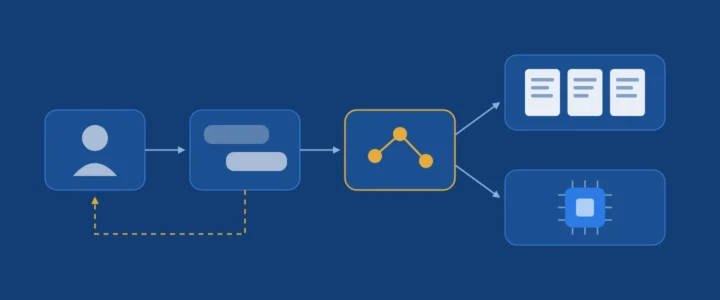
A support assistant is made of six components. The diagram below links them in the order a question goes through them.
- The interface: a chat widget on your website or portal, calling your own API (never the AI provider directly).
- The application API: authentication, rate limiting, logging.
- The orchestrator: the conversation logic (classify the request, retrieve, answer, escalate), written with LangChain and LangGraph.
- The knowledge base: your documents, chunked and indexed for search.
- The AI model: hosted on your premises with Ollama, or called through an API.
- Observability: Langfuse records every step to measure quality, costs and errors.
3. Step 1: build the knowledge base (RAG)
3.1 The principle
A language model does not know your institution. Asked about your internal procedure, it will produce a plausible but invented answer: a hallucination. Retrieval-augmented generation (RAG) fixes this: before answering, we search your documents for the relevant passages and ask the model to answer only from them.
Before building RAG, check whether you need it. Anthropic notes that a knowledge base under 200,000 tokens (about 500 pages) can be placed entirely in the prompt, with caching making it fast and inexpensive. Beyond that, RAG becomes necessary.
3.2 The ingestion pipeline
- Sources: FAQs, procedures, user guides, and anonymised resolved tickets, which often hold the best wording of real problems. Each document has an owner and a validity date.
- Extraction: converting PDFs, Word documents and web pages to plain text, keeping the headings.
- Chunking: passages of a few hundred words, with a slight overlap, each prefixed with its document title so it stays understandable on its own.
- Embedding: an embedding model turns each chunk into a vector representing its meaning. With Ollama, models such as
nomic-embed-textorbge-m3(multilingual) run locally. - Index: vectors are stored in a vector database (pgvector if you already use PostgreSQL, otherwise Qdrant or Chroma), alongside a BM25 lexical index.
3.3 Why hybrid search
Vector search finds chunks close in meaning, even without shared words (« registration fees » and « tuition charges »). BM25 lexical search excels on exact terms: a programme code, a form name, an error message. Combining both is now standard: in its Contextual Retrieval study (2024), Anthropic shows that combining them, with chunks enriched with context, cuts retrieval failures by 49%, and by 67% with an added reranking step.
4. Step 2: choose the AI model
This is the project’s structuring decision. There are two routes, and they are not mutually exclusive.
4.1 Option A: self-host the model with Ollama
Ollama is a free tool that downloads and runs open language models on your own server. A single command starts a model:
ollama pull qwen3.5:9b
ollama pull nomic-embed-text   # for embeddings
ollama serve                   # local API on port 11434
Here are models suited to support work, with characteristics taken from Ollama’s official catalogue (default quantised version):
| Model | File size | Context | Strengths |
|---|---|---|---|
qwen3.5:4b |
3.3 GB | 256K | Light, multilingual, tool calling; fits a small graphics card |
qwen3.5:9b |
6.6 GB | 256K | Good quality / resources balance; text and images, tool calling, thinking mode |
mistral:7b |
4.4 GB | 32K | Mistral AI’s model, proven and Apache 2.0 licensed |
qwen3.5:27b |
17 GB | 256K | Markedly more capable, for more nuanced answers |
Hardware required. The rule of thumb: graphics card memory (VRAM) must hold the model file, plus headroom for the conversation context, which grows with the length of the exchange.
- 4 to 9 billion parameter models: a graphics card with 8 GB of VRAM (12 GB recommended for long contexts), 16 to 32 GB of RAM, an SSD.
- Models around 27 billion parameters: a card with 24 GB of VRAM.
- Without a graphics card, on CPU only: feasible for a prototype with a small model, but too slow for several simultaneous users.
Advantages: data never leaves your infrastructure, no cost per question, works without internet access. Constraints: a hardware investment, maintenance (updates, monitoring), lower quality than the largest commercial models, and a limited number of simultaneous conversations per card.
4.2 Option B: use an API (OpenAI, Anthropic, Mistral)
Providers such as OpenAI (GPT), Anthropic (Claude) or Mistral AI give access to their models with an API key. Advantages: the most capable models, no infrastructure to run, instant scaling. Constraints: usage-based cost (billed per token), and data leaving your infrastructure. Read the data usage terms, the processing location and the data processing agreement on offer. For an institution keen to keep its data in Europe, Mistral AI is worth considering.
Three rules apply: the key stays on the server, never in the browser; a spending cap is set with the provider; the model version is pinned, so an update does not change the assistant’s behaviour before you have tested it.
4.3 Comparison and hybrid option
| Criterion | Self-hosted (Ollama) | Cloud API |
|---|---|---|
| Confidentiality | Maximum: nothing leaves | Depends on the provider’s contract |
| Cost | Hardware up front, then near zero per question | Zero up front, then proportional to usage |
| Answer quality | Good with recent mid-size models | The best available |
| Maintenance | Your responsibility | Handled by the provider |
| Scaling | Limited by your graphics cards | Instant |
Good news: Ollama exposes an OpenAI-compatible API. The same code can target either by changing one address, so you can start locally and switch later, or combine both: a local model for simple, sensitive tasks (classifying the request, removing personal data), an API for drafting complex answers.
from openai import OpenAI

# Option A: local model served by Ollama
client = OpenAI(base_url="http://localhost:11434/v1", api_key="ollama")
model = "qwen3.5:9b"

# Option B: same code, cloud provider (key read from the environment)
# client = OpenAI()
# model = "pinned-model-name"

response = client.chat.completions.create(
    model=model,
    messages=[{"role": "system", "content": instructions},
              {"role": "user", "content": question}],
)
5. Step 3: orchestrate with LangChain and LangGraph
LangChain provides the building blocks: connectors to models (Ollama, OpenAI, Anthropic, Mistral), document loaders, text splitters, vector store integrations. LangGraph, built by the same team, arranges these blocks into a state graph: nodes (functions that do work), edges (which decide the next step, possibly on a condition), a shared state, and a persistence mechanism (checkpointer) that keeps the conversation and lets the graph pause for human approval.
For a simple « retrieve then answer », LangChain is enough. As soon as the conversation must loop, branch or pause for a human, which is the essence of support, LangGraph is the right tool.
Here is the skeleton of this graph in Python. Each node’s function (classify, retrieve, draft, escalate) holds your calls to the model and the knowledge base:
from typing import TypedDict
from langgraph.graph import StateGraph, START, END
from langgraph.checkpoint.memory import MemorySaver

class State(TypedDict):
    question: str
    topic: str
    sensitive: bool
    chunks: list
    answer: str

graph = StateGraph(State)
graph.add_node("classify", classify)
graph.add_node("retrieve", retrieve)
graph.add_node("draft", draft)
graph.add_node("escalate", escalate)

graph.add_edge(START, "classify")
graph.add_conditional_edges(
    "classify", lambda s: "escalate" if s["sensitive"] else "retrieve")
graph.add_conditional_edges(
    "retrieve", lambda s: "draft" if s["chunks"] else "escalate")
graph.add_edge("draft", END)
graph.add_edge("escalate", END)

# The checkpointer keeps each conversation's history.
assistant = graph.compile(checkpointer=MemorySaver())
In production, replace the in-memory saver with a persistent checkpointer (PostgreSQL, for instance), so conversations survive a restart.
6. Step 4: observe with Langfuse
An AI assistant degrades silently: an outdated document, a model update or a new kind of question is enough to lower quality without any technical error showing up. Langfuse is an observability platform for AI applications, open source (MIT licence) and self-hostable. Its features useful for support:
- Hierarchical traces: every question is recorded with all its steps (classification, retrieval, model call), their inputs, outputs, durations and costs. You see exactly which chunks were retrieved for a wrong answer.
- Sessions and users: a whole conversation can be reviewed at once.
- Evaluations: user feedback (thumbs up or down), automated scoring by a judge model (LLM-as-a-judge), human annotation in review queues.
- Datasets and experiments: before changing model or prompt, rerun a reference set of questions and compare results.
- Prompt management: instructions are versioned outside the code, with rollback.
- Cost and latency: dashboards and alerts.
Langfuse is self-hosted with Docker; its architecture includes a web application, an asynchronous worker, PostgreSQL, ClickHouse, Redis and S3-compatible object storage. Two precautions: disable the usage telemetry that self-hosted instances send by default if your policy requires it, and mask personal data before it reaches the traces. Integration with LangChain and LangGraph is a simple callback handler.
Metrics to review weekly: share of answers without a source, escalation rate, user satisfaction, 95th percentile response time and cost per conversation.
7. Step 5: security and compliance
OWASP ranks prompt injection first among the risks of language model applications. For a support assistant, the essential defences are:
- retrieved documents are tagged as data, and the prompt states that any instruction they contain must not be followed;
- the model has no write access: creating a ticket or editing a record goes through your code, with its checks;
- any risky action requires human approval;
- inputs are limited in length and frequency, outputs checked in code;
- no personal data is indexed, and users are told they are talking to an AI.
8. Rollout roadmap
- Scoping: list the twenty most frequent questions, define the scope and escalation cases.
- Corpus: gather and approve documents, assign their owners.
- Prototype: a local model with Ollama and simple RAG, in a few days.
- Evaluation: a set of about fifty real questions with expected answers, measured in Langfuse.
- Internal pilot: the support team uses the assistant and corrects its answers.
- Production: public launch, with escalation and monitoring active.
- Continuous improvement: every escalation reveals a missing document; add it, re-evaluate.
This website’s assistant applies a deliberately lean version of this architecture: content exported and split into chunks of about 900 characters, BM25 search, six chunks sent to the model, an endpoint limited to 30 questions per hour per IP address, and an explicit rule that chunks are data, not instructions.
Key takeaway
A good support assistant is first a good knowledge base. The model, local or via API, drafts; your documents are the authority; the orchestrator decides when to hand over to a human; observability tells you, every week, whether the whole system keeps its promises.
Set up this assistant in your organisation
University, school, public body or company: we design and deploy AI support assistants tailored to your documents and constraints, self-hosted with Ollama or via API, with LangGraph and Langfuse monitoring. Scoping, building the corpus, prototype, training your teams: let’s talk about your project.
References
- Ollama, qwen3.5 and mistral (model catalogue).
- LangChain, LangGraph: interrupts and checkpointing.
- Langfuse, documentation and self-hosting.
- Anthropic, Contextual Retrieval, 2024.
- OWASP Gen AI Security Project, LLM01:2025 Prompt Injection.
We would love to hear your experience
Did you make different choices? Run into other difficulties? Share your experience or your questions in the comments: we read and answer every message.
Leave a commentNeed a custom business application?
Admissions platforms, staff management, AI assistants, e-learning: we design, deploy and maintain applications tailored to your organisation.
Let's talk about your project
Comments
No comments yet: be the first to share your experience.