

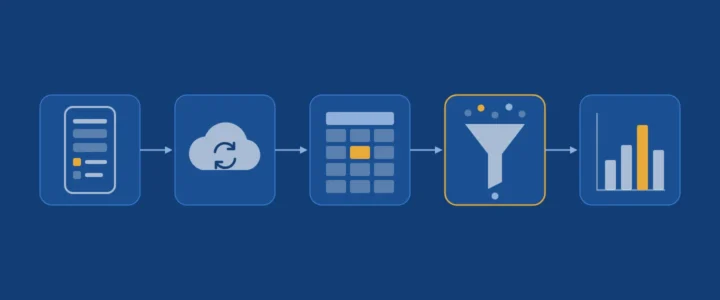
In a field survey, the quality of the analysis is decided before the first interview. A poorly designed questionnaire produces data no statistical method can repair: free-text answers impossible to group, outliers, questions asked of people they did not apply to. KoboToolbox, a free tool widely used by researchers and humanitarian organisations, prevents most of these problems at the form design stage. This article describes a complete pipeline, from protocol to analysis.
Learning objectives
- design a form in the XLSForm format, distinguishing technical name from label;
- use constraints, display conditions and required fields to ensure quality at the source;
- organise the pilot, offline data collection and daily follow-up;
- export the data correctly and clean it with Python.
1. The pipeline in five steps
- Protocol: research questions, population, sample, ethical considerations and consent.
- Form design in XLSForm.
- Pilot with a few real respondents, then corrections.
- Collection, often offline, with daily follow-up.
- Export, cleaning and analysis.
An hour spent on the form saves a day of cleaning. That is the guiding idea of this article.
2. XLSForm: a questionnaire written as a spreadsheet
XLSForm is a standard that describes a questionnaire in an Excel workbook with three sheets: survey (the questions), choices (the answer options) and settings (the form title and ID). KoboToolbox imports it directly.
2.1 Name and label
Each question has a name (name), short and without spaces, which becomes the column name in your data, and a label (label), the sentence the enumerator reads. Choose explicit, stable names: household_age rather than q7. On analysis day, you will be glad you did.
2.2 Quality tools
| Column | Role | Example |
|---|---|---|
required |
Makes the answer mandatory | yes |
constraint |
Rejects an invalid value; the dot refers to the current answer | . >= 15 and . <= 100 |
constraint_message |
Explains the error to the enumerator | « Age must be between 15 and 100 » |
relevant |
Shows the question only if a condition is true | ${has_job} = 'yes' |
calculate |
Computes a value from other answers | ${monthly_income} * 12 |
The relevant condition deserves special attention: by asking a question only of the people concerned, it avoids both respondent fatigue and absurd answers. An empty cell in the data then has a precise meaning: question not asked, not missing answer.
2.3 Prefer closed choices
The select_one (single answer) and select_multiple (several answers) types produce data ready for analysis, unlike free text. In the choices sheet, give each option a short, stable name. Plan explicitly for « Other (specify) », « Don’t know » and « Refused to answer »: these are information, not errors, and confusing them with a missing answer distorts percentages.
3. Pilot and collection
The pilot is not a formality. Run the questionnaire with a few real respondents, time it, watch for questions that cause hesitation, and check the export of the pilot data before any deployment: this is when you discover that a question was coded incorrectly.
In the field, the KoboCollect app lets enumerators work offline and send forms as soon as a network is available. During collection, check KoboToolbox’s built-in reports every day (response counts, charts per question) and the map of geolocated submissions: an enumerator sending three times as many forms as colleagues, or GPS points far from the study area, are spotted early and easily corrected.
4. Export correctly
KoboToolbox exports to Excel, CSV, GeoJSON or KML. For analysis, its documentation recommends two settings:
- export XML values and headers (the technical names) rather than labels, which remain preferable for sharing raw data with a non-technical audience;
- split select_multiple answers into separate columns, one per option.
Also remember to include data from all form versions if you modified the form during collection.
5. Clean with Python
Even with a good form, some cleaning remains. A script, rather than manual edits in a spreadsheet, keeps a record of every transformation and makes the analysis reproducible:
import pandas as pd

df = pd.read_csv("kobo_export.csv", sep=";")

# 1. Duplicate submissions (same instance identifier).
df = df.drop_duplicates(subset="_uuid")

# 2. Types: dates as dates, numbers as numbers.
df["interview_date"] = pd.to_datetime(df["interview_date"])
df["household_age"] = pd.to_numeric(df["household_age"], errors="coerce")

# 3. Special codes: "don't know" (98) and "refused" (99) are not ages.
df["household_age"] = df["household_age"].mask(df["household_age"].isin([98, 99]))

# 4. Log of checks, to attach to the report.
print(df["household_age"].describe())
print(df.isna().sum().sort_values(ascending=False).head(10))
Each step is commented and reversible: never edit the original export file; produce a cleaned dataset alongside it.
6. Ethics and data protection
Collect informed consent at the start of the form, and make the rest conditional on it using relevant. Collect only the data your research questions need. Keep directly identifying information (name, phone number) separate from the answers, and limit project access to those who need it.
Common mistakes
- Free-text questions where a closed list would do.
- Generic column names (
q1,q2) impossible to interpret six months later. - Confusing « not asked », « don’t know » and « refused ».
- Cleaning by hand in Excel, with no record of corrections.
Key takeaway
Survey quality is built into the form: closed choices, constraints, display conditions and explicit codes for non-response. The rest of the pipeline preserves that quality, traceably.
References
- KoboToolbox, Data analysis with KoboToolbox.
- XLSForm, reference documentation.
- United Nations (UNGEGN), Manual guide: data collection using KoboToolbox (PDF).
We would love to hear your experience
Did you make different choices? Run into other difficulties? Share your experience or your questions in the comments: we read and answer every message.
Leave a commentNeed a custom business application?
Admissions platforms, staff management, AI assistants, e-learning: we design, deploy and maintain applications tailored to your organisation.
Let's talk about your project
Comments
No comments yet: be the first to share your experience.